If you’re wondering how to rank Google My Business fast for your clinic, lab, salon, or local business in India, you’re not alone. Most so-called Google My Business ranking tips online focus on shortcuts, but in reality, consistent basics are what drive sustainable local rankings.
Your competitor, sometimes smaller or newer than you, shows up in the top 3 Google Maps results, while your business stays buried—even though you’ve created a Google My Business profile, verified it, and added a few photos.
I’ve seen this exact situation play out with dozens of local businesses. Most owners assume that once a GMB profile is live, Google will automatically start sending customers. Unfortunately, that’s not how it works.
Google My Business ranking follows a process. And while there are no shortcuts or “hacks,” you can rank faster if you focus on the things Google actually cares about—not the myths floating around online.
Quick Answer: How to Rank Google My Business Fast
These are not theoretical ideas; they are practical Google My Business ranking tips that have worked across clinics, labs, and service businesses. If you want a clear, no-nonsense answer, this is what genuinely works based on real implementation experience:
- Complete your Google My Business profile 100%, not partially
- Choose the correct primary business category
- Get consistent reviews from real customers
- Post updates and add new photos regularly
- Keep your business name, address, and phone number consistent everywhere online
- Actively engage with your listing (reviews, Q&A, messages)
- Add all real services and products on both your GMB profile and website
These are not hacks. This is simply how Google decides which businesses deserve to appear in the top 3 local results.
What Actually Determines GMB Rankings (Explained Simply)
Understanding these factors is essential if you genuinely want to how to rank Google My Business fast without relying on risky shortcuts.
Proximity
This is about distance. If someone searches “diagnostic lab near me,” Google prioritizes businesses close to their location.
You cannot control this factor, and that’s okay. This is why your ranking may change depending on where the searcher is standing.
Relevance
Relevance means how closely your business matches the search.
If your profile says “Clinic” but someone searches for “Dermatologist,” Google may skip your listing even if you offer that service. Categories, services, and descriptions play a huge role here.
Prominence
Prominence is Google’s trust score for your business.
It looks at:
- Reviews and ratings
- How often people click your listing
- How active your profile is
- Mentions of your business across the web
In my experience, most local businesses worry too much about proximity (which they can’t change) and completely ignore relevance and prominence (which they can improve).
Step-by-Step: What You Actually Need to Do
The following steps are core GMB optimization tips that help Google understand your business more clearly and rank it with confidence.
1. Complete Your Profile Fully (This Comes First)
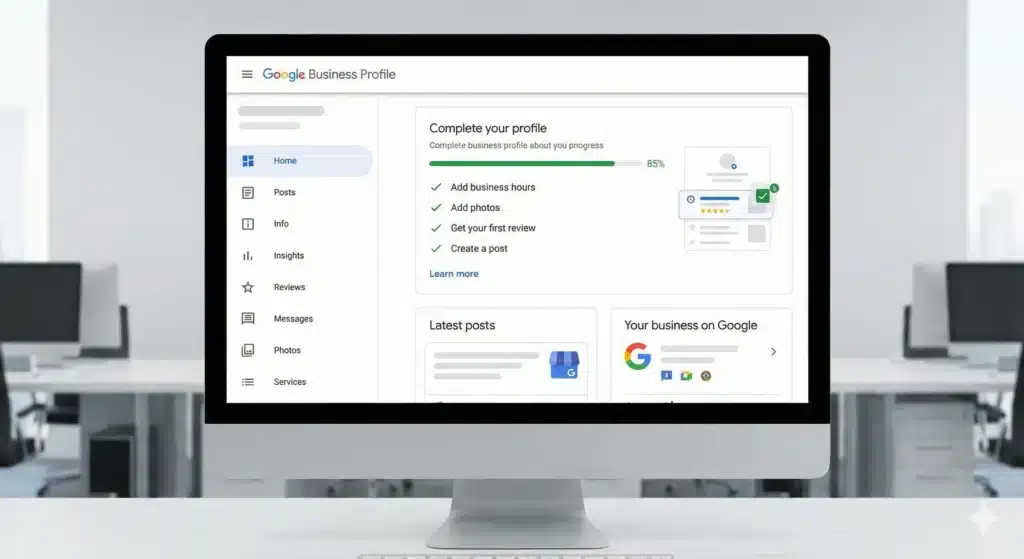
Open your GMB dashboard and fill every single field.
Business description, services, products, attributes, hours, appointment links—everything.
Many businesses treat this like a one-time form. They add basic details and move on. But Google clearly favors profiles that are fully completed.
If two similar businesses exist and one profile is 100% complete while the other is 60% complete, the complete one almost always wins.
Primary Category Matters More Than You Think
Choosing the right primary category is critical.
Don’t guess. Look at the businesses ranking above you and see what category they’re using. Choose the most specific and accurate option, not a generic one.
2. Reviews: This Is Non-Negotiable
You cannot rank Google My Business fast without reviews.
From what I’ve seen:
- 5–10 reviews in the first month
- Then 2–3 reviews per week consistently
This pattern usually shows ranking movement within 4–6 weeks.
The best way to get reviews is simple and honest. Ask customers after a good experience and share a direct review link. Most people are willing to help when asked politely.
Also, respond to every review, even with a short thank-you. Engagement matters.
3. Post Regularly to Show Google You’re Active
Google prefers active businesses.
Use the “Posts” feature once a week. It doesn’t need to be creative or promotional.
You can post:
- Service updates
- New photos
- Offers
- Health tips (for clinics and labs)
- Announcements
I’ve seen businesses with fewer reviews outrank competitors simply because they post consistently while others stay inactive. Regular posting is one of the most ignored yet effective GMB optimization tips, especially in competitive local markets.
Silence signals inactivity. Activity signals trust.
4. NAP Consistency (Boring but Extremely Important)
NAP stands for Name, Address, and Phone number.
Whatever you write on your GMB profile must match exactly:
- Your website
- Facebook page
- Justdial, Sulekha, Practo, directories
Even small differences create confusion for Google.
Fixing NAP inconsistencies often produces faster improvements than people expect.
5. Connect Your Website Properly
You can rank without a website, but having one helps significantly.
Make sure your website:
- Shows your address and phone number clearly
- Embeds Google Maps on the contact page
- Uses the same business details as GMB
This reinforces your legitimacy and strengthens local SEO signals.
Things That Don’t Work (And Can Hurt You)
Let’s clear a few myths.
- Fake reviews: High risk, short-term gain, possible suspension
- Keyword stuffing business name: Direct policy violation
- Random posting: Inconsistent activity doesn’t help
- Expecting instant results: GMB is organic, not paid ads
Anyone promising top rankings in 7 days is either misleading you or risking your listing.
How Long Does It Really Take to Rank?
Many business owners want to rank Google Business Profile fast, but realistic timelines depend heavily on competition and consistency.
- Low-competition areas: 2–3 weeks
- Moderate competition: 4–6 weeks
- High-competition cities: 2–3 months
Most business owners asking how to rank Google My Business fast need to understand that “fast” in local SEO usually means steady improvement over a few weeks, not overnight results.
The businesses that dominate local search are the ones that treat GMB as an ongoing system, not a one-time setup.
Common Questions Business Owners Ask
Can I rank without running Google Ads?
Yes. If your goal is to rank Google Business Profile fast, focusing on reviews, relevance, and engagement matters far more than paid shortcuts.
Why does my competitor rank higher with fewer reviews?
They may have better category selection, higher engagement, stronger NAP consistency, or simply better proximity.
Should I manage this myself or hire someone?
If you have time and discipline, you can manage most of it yourself. Most businesses need help with strategy, consistency, and cleanup—not basic setup.
What You Should Do Next
If you’re serious about learning how to rank Google My Business fast, the first step is to audit your profile honestly and fix the basics before chasing advanced tactics. Take 30 minutes this week and audit your profile:
- Is every field filled properly?
- When was your last post?
- How many reviews did you get recently?
- Is your business info consistent everywhere?
Most business owners immediately find 3–4 gaps they’ve been ignoring.
If you want a second opinion, we’re happy to audit your Google My Business profile and point out what’s holding it back—no pressure, no sales talk, just practical advice from someone who’s seen this work.
OUR SOURCES FOR THE BLOG:
To Read Our Other Blogs Click Here